
From Question to Cited Answer: How SmartSearch AI Works
An employee needs a policy. A customer needs a product answer. An AI agent needs context before its next step. The information may exist, but finding the right version across websites, documents and business systems takes time.
SmartSearch AI brings those sources into a search and answer experience for people and AI agents. Its architecture connects three practical needs: finding relevant information, applying access rules and showing the evidence behind an answer.
The diagram describes that journey in five stages: Identify, Screen, Retrieve, Generate and Cite. Around them sit the controls for content, departments, tuning and review.
A question enters through a website, portal, app or AI assistant.
- 1. Identify
Establish identity and access scope. - 2. Screen
Apply input guardrails. - 3. Retrieve
Find and rank permitted evidence. - 4. Generate
Draft with your chosen model. - 5. Cite
Link the answer to its sources.
View the full SmartSearch AI 4.7 architecture diagram. The sections below explain its flow and availability labels.
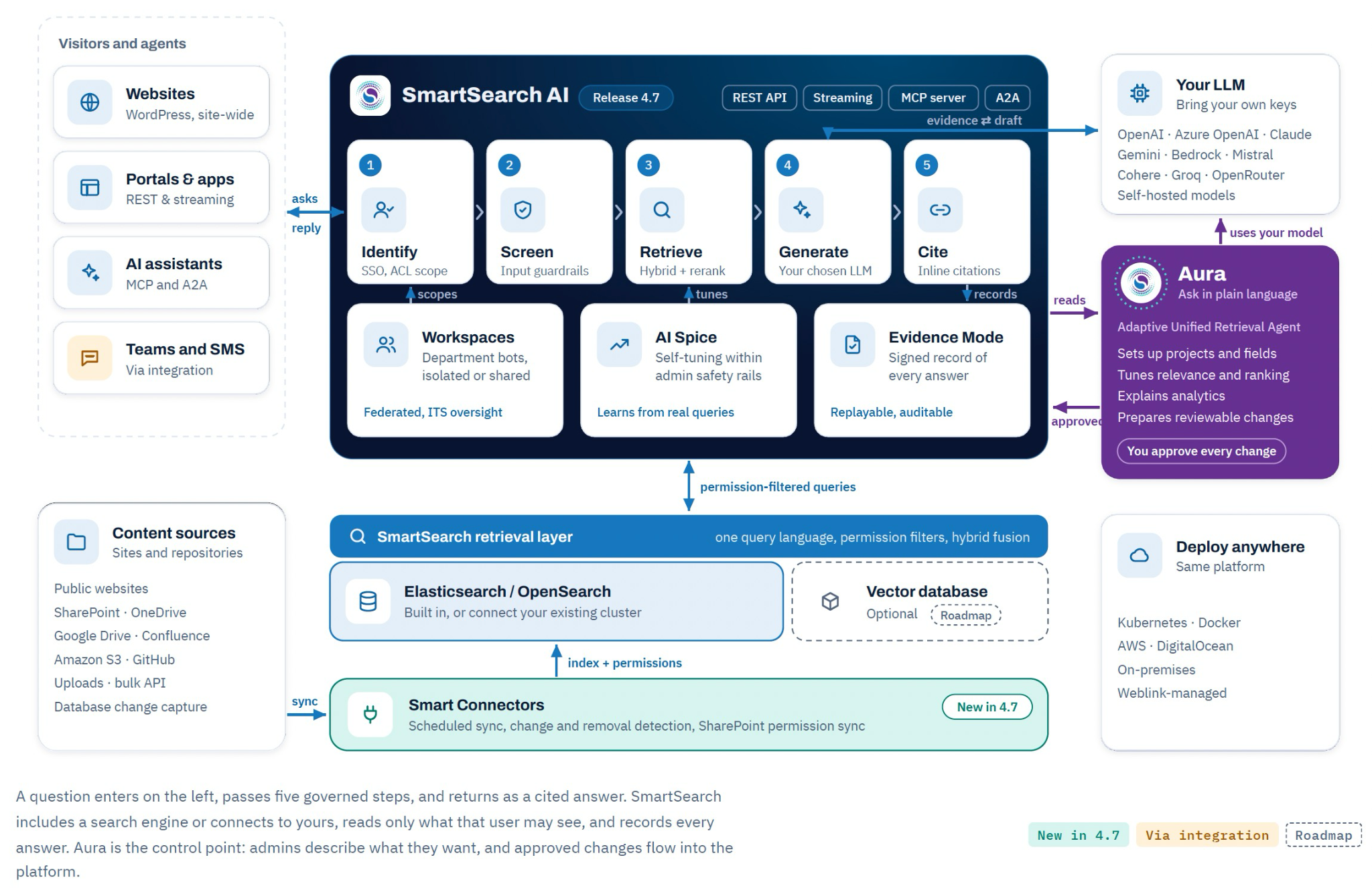
Before a question: connect the content
Useful answers begin with useful source material. Smart Connectors, marked New in 4.7, crawl selected websites and sync repositories such as SharePoint, OneDrive, Google Drive, Confluence, Amazon S3 and GitHub.
Scheduled sync detects changed and removed content. SharePoint permission sync brings access information along with the content. This is a continuing process: a source change must be detected and processed before the searchable copy reflects it. Teams should choose sync settings appropriate to their sources.
SmartSearch AI includes a search engine, or connects to an existing Elasticsearch or OpenSearch cluster. The optional vector database shown in the diagram is Roadmap and is not shipping.
1. Identify: establish the access scope
For a signed-in experience, single sign-on establishes who is asking. SmartSearch AI supports SAML 2.0 and OpenID Connect, with document access rules scoped by user, group, role or key.
Consider an employee asking about parental leave. The relevant employee policy may be available to them, while a restricted HR case file is outside their access. That distinction needs to shape the evidence selected for the answer.
Workspaces add departmental context. Departments can have their own assistants, content, analytics and transcripts, with knowledge isolated or shared and central IT oversight.
2. Screen: apply the configured guardrails
The next stage screens the incoming request. SmartSearch AI’s guardrail categories include safety, personal information, prompt injection and secrets. The platform also supports output screening.
These controls help teams define how an assistant handles requests within their policies. Their value depends on configuration and testing against the situations the organization expects to encounter.
3. Retrieve: find relevant, permitted evidence
The retrieval layer queries the connected search engine with permission filters. Those permissions apply before retrieved text is sent to the model.
Hybrid search combines keyword and semantic matching; reranking helps order the results for the question. This matters when an employee’s wording differs from the language used in a policy, or when several documents mention the same topic.
For the parental-leave example, the goal is to find the relevant policy and supporting guidance within that person’s scope. The quality, coverage and freshness of those sources still matter.
4. Generate: use your chosen model
The selected evidence provides context for the language model to draft an answer. SmartSearch AI supports customer-configured connections to providers including OpenAI, Azure OpenAI, Claude, Gemini and Bedrock, as well as self-hosted models.
Model choice is part of the deployment design. With an external provider configured, evidence sent for generation goes to that provider. Hosting the search platform in your environment does not, by itself, mean every model call stays there. Teams should align the model connection and provider terms with their requirements.
5. Cite: make the evidence visible
The answer returns with inline citations so the reader can follow it back to the supporting pages or documents. If the evidence is missing, the assistant is designed to say so.
For an employee reviewing a policy answer, that creates a route to check the wording, exceptions and context in the source. Citations make an answer easier to inspect; they do not guarantee that every interpretation is correct.
Evidence Mode adds a signed, tamper-evident record of how an answer was produced, supporting replay and review. It provides evidence for oversight without promising a particular compliance outcome.
Improve search while retaining control
Two capabilities support improvement around the answering flow.
AI Spice learns from real queries and supports self-tuning within administrator-defined safety rails. Those rails define the boundaries for automatic tuning.
Aura, the Adaptive Unified Retrieval Agent, helps administrators and developers work on search in plain language. It can read the configuration, explain analytics, help set up projects and fields, and prepare relevance or ranking changes.
For example, an administrator might ask why accessories rank above the main products. Aura can investigate and prepare a proposed adjustment. Its configuration changes go through a review screen and require explicit approval before taking effect. A conversation with Aura does not itself edit the configuration.
Aura uses a chosen model connection that is configured separately from the models powering search. Administrators can review proposed changes in the context of their own environment.
Reach users through the right interface
The architecture supports websites, portals and applications through REST and streaming interfaces, alongside AI assistants through MCP and A2A. Teams and SMS are available via integration; they should be scoped as integration work.
Weblink Technologies installs and tunes SmartSearch AI with your team in your cloud or data center. Deployment options include Kubernetes and Docker, using the included engine or your existing Elasticsearch or OpenSearch cluster.
The architecture gives a demo a concrete agenda: use your content, ask representative questions, check access boundaries, inspect citations and review an Aura proposal.
Book a SmartSearch AI demo to walk through that flow with Weblink Technologies.